


HOSHI JJRC R22 CADY WISH Robot
- Regular price
- $72.99
- Regular price
-
$0.00 - Sale price
- $72.99
- Unit price
- per
Shipping in
Sku : 14:200006153#R22 white 1B
Couldn't load pickup availability
A small interactive robot with more than one way to play
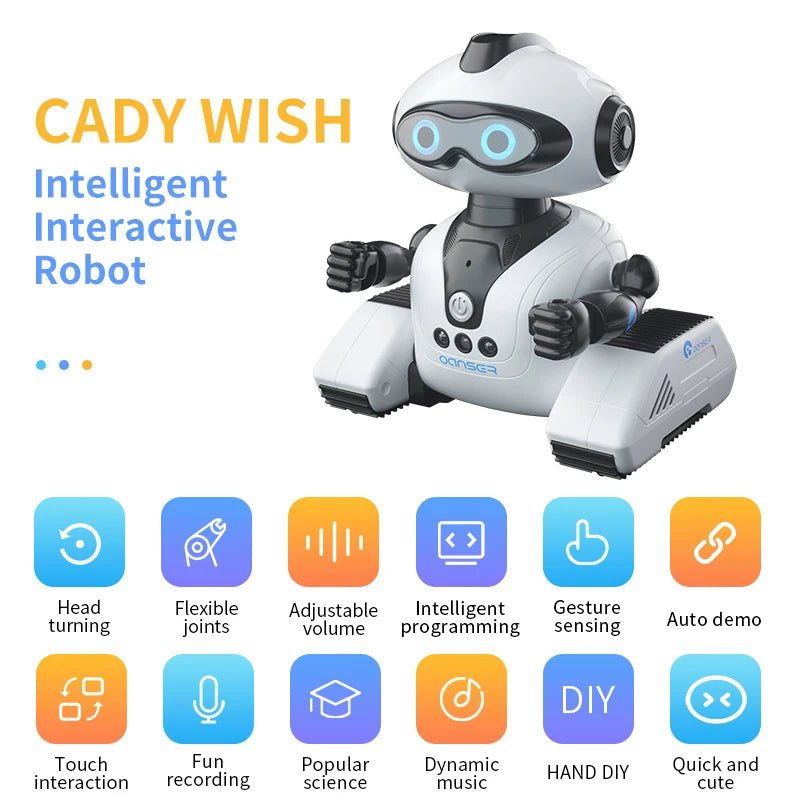
The JJRC R22 CADY WISH robot is made for children who want to do more than press a single button and watch. They can steer it with the remote, guide basic movements with hand gestures, tap its head for a response, record a short phrase, build a movement sequence and start an automatic demonstration.
It comes in white or pink on the current product page. Its compact tracked base is suited to a smooth, flat indoor floor or tabletop, while the moving head, arms, LED-style eyes, music and sound effects give it plenty of character.
Quick facts before you choose
| Detail | Current product information | What it means for the buyer |
|---|---|---|
| Model | JJRC R22 CADY WISH | A compact 2.4G remote-control interactive robot. |
| Live colour choices | R22 White 1B or R22 Pink 1B | Select the colour in the product options above; the displayed price may change with the selection. |
| Robot size | About 14.2 × 10.8 × 14.5 cm | Small enough for a desk or play table, but allow clear floor space for movement. |
| Robot weight | About 258 g | Supplier estimate for the robot; packaged weight is listed separately. |
| Robot power | 3.7V 220mAh rechargeable lithium battery listed as included | Charge with the supplied USB cable and follow the battery instructions included in the box. |
| Remote power | 2 × AA batteries, not included | Have two fresh AA batteries ready before the first play session. |
| Charging time | About 30 minutes in the current supplier text | Treat this as an estimate and follow the supplied manual and charge indicator. |
| Working time | About 45–50 minutes | Actual time can change with movement, music, volume and battery condition. |
| Remote range | Up to 30 m in supplier information | Walls, other devices and battery level can reduce practical range. |
| Maximum speed | Supplier lists 5 km/h | Use it in a clear area away from stairs, pets, drinks and fragile objects. |
| Assembly | Ready to go | Install the remote batteries, charge the robot if needed and read the instructions before use. |
Why this robot keeps play interesting
Control it three ways
- Use the handheld remote for forward, backward, left and right movement.
- Wave a hand near the sensor to trigger basic movement responses.
- Touch the top of the head to prompt a sound or movement reaction.
Create a movement routine
The “programming” function lets a child arrange supported actions into a short sequence and then ask the robot to perform them. It is simple command sequencing rather than screen-based coding, so the result is visible straight away.
Music, movement and recording
Start a dance or music mode, adjust the volume, or record a short phrase for the robot to repeat. It is a playful playback feature, not an internet-connected voice assistant.
Automatic play modes
One-key auto demonstration runs a set of movements and sounds. Patrol mode uses obstacle sensing to react when something is in front of the robot, then reverse or turn to find another path.
What the JJRC R22 can do
Movement and steering
- Move forward and backward.
- Turn left and right.
- Rotate in place using the tracked base.
- Run a one-key automatic performance.
Interactive responses
- Respond to supported hand gestures with movement and sound.
- React when the sensor area on top of the head is touched.
- Record and repeat a short phrase.
- Use moving joints, head motion and illuminated eyes during play.
Music and learning-style play
- Sing, dance and play built-in music.
- Adjust the sound volume from the remote.
- Use the popular-science or knowledge button shown on the remote.
- Arrange supported actions into a simple programmed routine.
Patrol and obstacle response
When the front sensor detects an obstacle, the robot is designed to give a sound prompt, move back and turn. This feature can make floor play more lively, but it is not a safety sensor and should not be trusted near stairs, ledges or water.
Simple setup and first play
- Check the box. Confirm that the robot, remote control, USB charging cable and instructions are present. The supplier accessory image also shows a screwdriver; package contents can vary, so check the delivered pack.
- Charge safely. Connect the supplied USB cable to the robot as directed in the manual. Charge on a dry, non-flammable surface and disconnect it when charging is complete.
- Add remote batteries. Install two AA batteries in the remote with the correct polarity. These batteries are not listed as included.
- Choose a clear area. Start on a smooth, flat indoor surface. Remove cords, cups and small objects that could catch under the tracks.
- Learn the basic controls. Try forward, backward and turning before using gesture sensing or programming mode.
- Build a short sequence. Enter a few supported movement commands, play the routine and change one step at a time so a child can see how the order affects the result.
Which option should you select?
| Option | Appearance | Selection advice |
|---|---|---|
| R22 White 1B | White shell with dark details and blue-lit eye graphics | Choose the white thumbnail in the option selector and check the displayed price before adding to cart. |
| R22 Pink 1B | Pink shell with dark details and blue-lit eye graphics | Choose the pink thumbnail in the option selector and check the displayed price before adding to cart. |
Important: An existing supplier image describes rechargeable and non-rechargeable configurations, but the current live selector presents colour choices rather than a battery-type choice. The current text lists an included rechargeable robot battery. Confirm the exact selected configuration if this detail affects your order.
Package information and listed contents
| Item | Supplier information | Buyer check |
|---|---|---|
| Package size | About 17 × 14 × 14 cm | Useful for estimating gift wrapping and storage space. |
| Package weight | About 465 g in the text; one rechargeable-package image shows 472 g | Treat the small difference as supplier-image variation. |
| Robot | 1 | White or pink according to the selected option. |
| Remote control | 1 | Requires two AA batteries, not included. |
| USB charging cable | 1 for the rechargeable version | Use it according to the supplied instructions. |
| Instruction manual | 1 | Keep it for charging, programming and button guidance. |
| Screwdriver | Shown in the accessory image | The written list does not clearly confirm it, so package inclusion should be checked on arrival. |
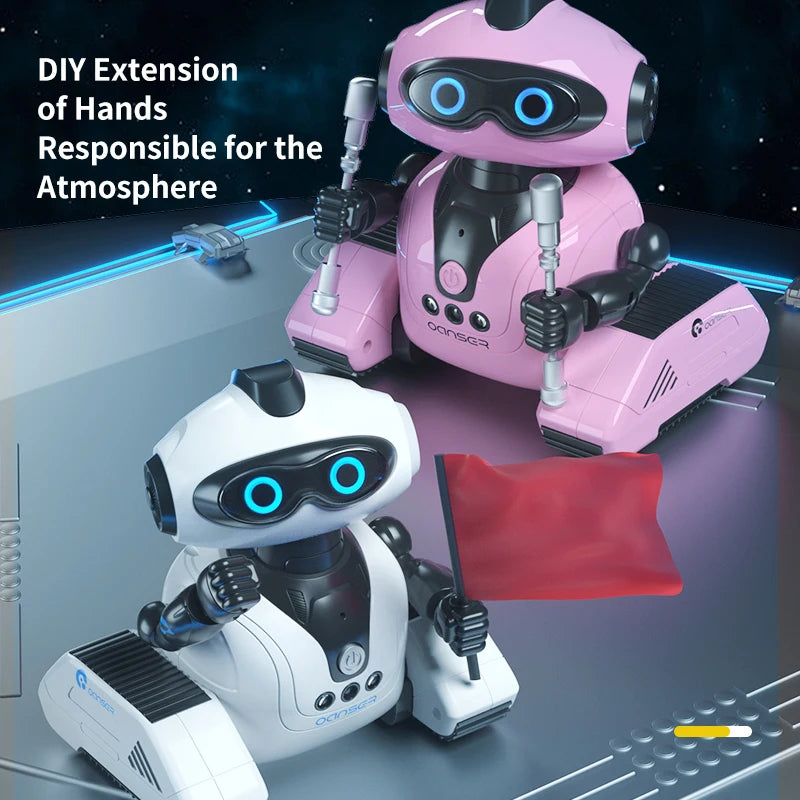
| DIY hand props | Not included | Flags, rods, launcher-style props and targets in the feature images are demonstrations, not confirmed box contents. |
Battery care, surfaces and storage
- Do not overcharge the robot or leave it connected to power after charging is complete.
- Keep the robot and battery away from heat, fire and water.
- Do not charge a damaged, swollen or unusually hot battery. Stop use and seek appropriate battery-disposal advice.
- Use the robot on a clean, dry and level surface. Carpet pile, hair and string can interfere with the tracks or auxiliary wheel.
- Wipe the shell with a dry or lightly damp cloth. Do not immerse the robot or spray cleaner into the joints, speaker openings or charging port.
- Remove the AA batteries from the remote before long storage to reduce the risk of battery leakage.
Existing product images, explained
These are the images already used on the product page. Each description explains what the image is intended to show and flags props or configuration details that should not be mistaken for guaranteed package contents.


Original supplier catalogue fields, clarified
The previous description included duplicated and machine-imported fields. They are kept below so the original information is not lost, with a note where a field is unclear or conflicts with the product images.
View all imported catalogue fields
| Original field | Original value | Clarification |
|---|---|---|
| Brake | Roller skating | Imported marketplace wording; not a useful brake specification for this toy. |
| Brand name | PYLRC in one field; JJRC in the technical text | The product title, model and image branding identify the toy as JJRC R22 CADY WISH. |
| Certification | 3C, CE | Supplier-listed claim. Check the delivered packaging or request documentation if certification is important to your purchase. |
| Choice | Yes | Marketplace catalogue flag, not a product feature. |
| High-concerned chemical | None | Supplier statement; no supporting test document is shown on the page. |
| Batteries included | Yes | The rechargeable robot battery is listed as included; two AA remote batteries are not included. |
| Is electric | AA battery | Conflicts with the rechargeable-body-battery text and configuration image. The remote uses two AA batteries. |
| Maximum speed | 5 km/h | Supplier-listed maximum. |
| Model number | JJRC R22 | Matches the current product title. |
| Motive | Fantasy and sci-fi, sport, music | Marketplace theme tags. |
| Origin | Mainland China | Supplier-listed origin. |
| Power source | Electric | The robot and controller are battery powered. |
| Recommended age | 14+y, 3–6Y, 6–12Y; also 12Y, 14Y, 3/6Y and 6/12Y | Conflicting imported tags. A box image shows Age 8+. Check the delivered product marking and current instructions. |
| Remote control | Yes | A handheld remote is listed and shown. |
| Remote distance | 30 m | Supplier-listed range under suitable conditions. |
| State of assembly | Ready-to-Go | Battery setup and charging are still required. |
| Theme | Animals & Nature, Transportation, Fantasy & Sci-Fi, Occupations, Sports, Music | Imported marketplace tags; some do not describe a physical feature. |
| Torque | /, No | Malformed supplier data; no usable torque specification is provided. |
| Warning | Not for kids under 3 months | This warning is clearly inconsistent with the other age labels and small-parts imagery. Follow the delivered packaging and current safety instructions instead. |
| semi_Choice | Yes | Marketplace catalogue flag, not a buyer-facing specification. |
Questions parents and gift buyers may ask
What does “programming” mean on the JJRC R22?
It means arranging supported movement commands into a short sequence and then playing that sequence back. It is a hands-on introduction to order and cause-and-effect, not app-based coding or a programmable computer.
Is this a conversational AI robot?
No. It uses preset controls, gestures, touch reactions, recording playback and automatic routines. It is interactive, but it is not described as an internet-connected chatbot that understands open-ended questions.
Can the robot record a child’s voice?
The supplier images show a fun-recording function that records and repeats short phrases. It should be treated as a simple record-and-playback feature rather than voice recognition.
Is the robot rechargeable?
The current supplier text lists a 3.7V 220mAh rechargeable robot battery and USB cable as included. An older configuration image also shows a non-rechargeable version, while the live product selector only shows white and pink “1B” options. Confirm the selected configuration with Toys4us if this is a deciding factor.
Do I need to buy batteries?
Yes. The handheld remote requires two AA batteries, and they are not listed as included. The robot’s rechargeable body battery is listed as included for the rechargeable configuration.
How long does the robot run?
The current supplier description estimates about 45–50 minutes of working time. Music volume, movement, battery condition and how the toy is used can shorten or extend a play session.
What age is the JJRC R22 for?
The supplier data is inconsistent, and the package image shows Age 8+. Check the age marking and warnings on the delivered box before use. Because the feature images include small DIY props, adult supervision is sensible and small loose parts should be kept away from younger children.
Where does the robot work best?
Use it on a clean, smooth and level indoor surface with room to turn. Thick carpet, uneven paving, long-pile rugs, hair and loose cords can interfere with the tracks or bottom wheel.
Will obstacle avoidance stop it falling down stairs?
No. Obstacle response is designed to react to objects in front of the robot; it should not be treated as edge or stair detection. Keep it well away from steps, balconies, tabletops without barriers and water.
Are the flag, launcher and targets included?
They are not confirmed as package contents. The supplier images describe the hand attachments as DIY examples and state that small hand-DIY parts are not included. The listed core pack is the robot, remote, USB cable for the rechargeable version and instructions.
Choose the colour, then check the selected details
Select R22 White 1B or R22 Pink 1B in the product options above. Check the price and selected thumbnail, have two AA batteries ready for the remote, and contact Toys4us before ordering if you need confirmation of the age marking or rechargeable configuration.